
Define a member in a role for the next Rotary Year
Audience: AGs, Club Presidents
Topic: How to define a member in a role for the next Rotary Year.
- AGs:
- Click on the “CLUBS” tab
- Scroll to the club that you want to update and click on the pencil icon to edit
(You will only see the icons beside the clubs in your area) - Skip to step 3
- Club Presidents:
- Click on the “My CLUB” tab
- Click on the “Edit Club” button
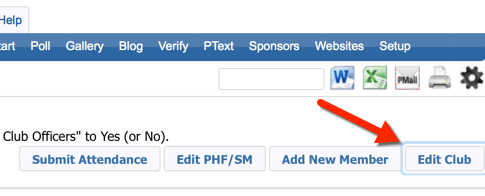
- Proceed to 3.
- Click on the Positions Tab
- Select the Org Year that you want
- Click on the Pencil/Edit icon beside the member that you want to update
- Click on “Add”
- Set the Start date – typically July 1 for the coming year
- Set the End date – typically June 30 of the following year
- Under “Club Positions”, click on the small “Add” button to the right of the open field
- Select the position (s) for the member for the coming year.
- Scroll down and click on “Save”
- Click on the “Add” button
- Done.
– OR –
Watch the following video. The video is geared to AGs however Club Presidents can advance to 30 seconds into the video for what to do on the Edit Club Screen, after completing Step 2 above.